
Which Mac engine runs Qwen3.8-27B fastest? We tested nine
Paris Michalas, NetProjects.com
We used one model, the same 4-bit weights and one MacBook Pro for all of them. The winner was the engine that reads prompts fastest, not the one that writes fastest.
On a Mac, the engine you run a local model with matters almost as much as the model itself. We took the stock Qwen3.8-27B and converted it to 4-bit once. Then we ran it through nine engines in fourteen setups on a MacBook Pro M5 Max with 128 GB of memory. We wanted to know one thing: how long does real work take?
The short answer
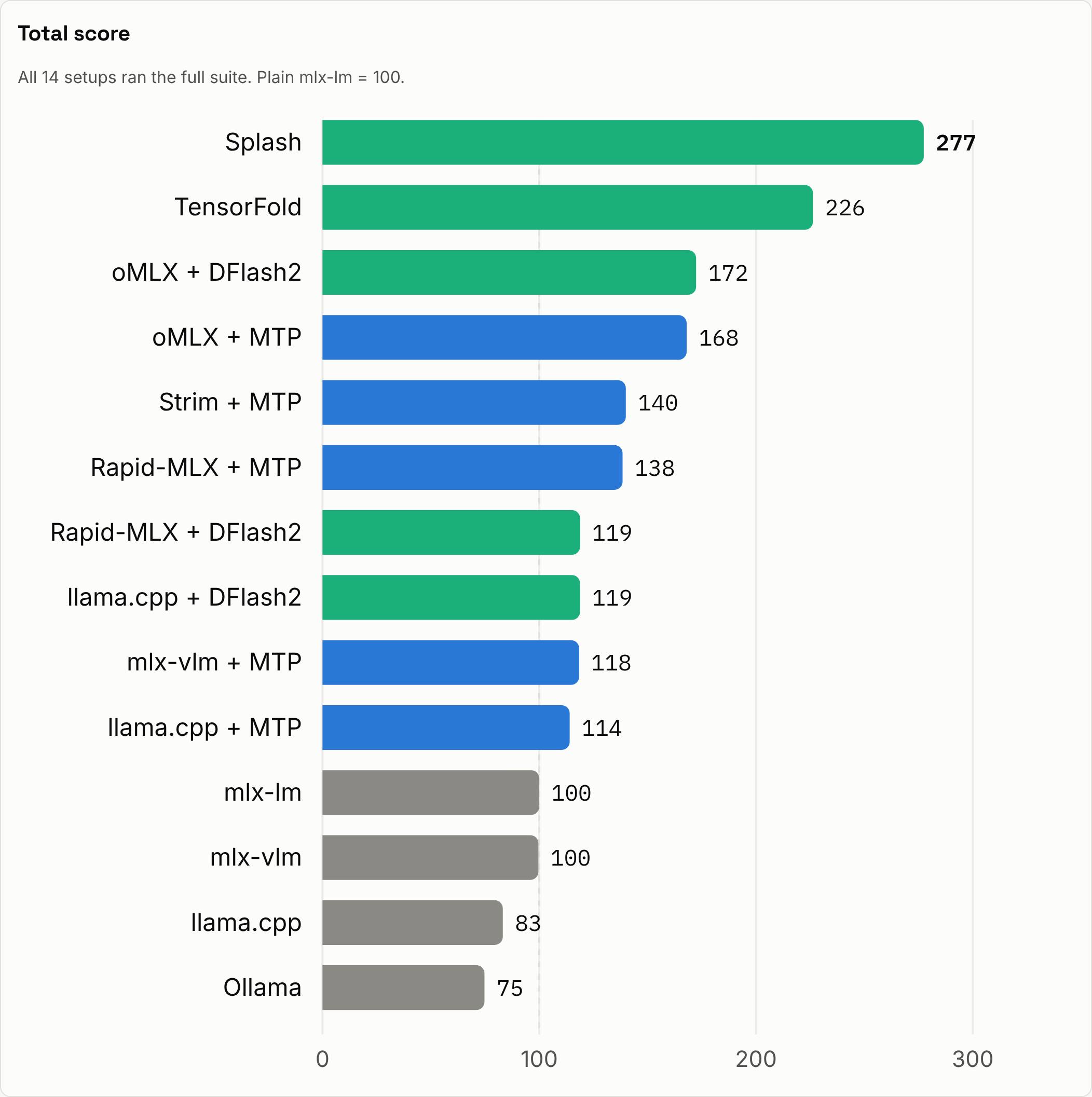
- Splash is the fastest overall. It scores 277, where plain mlx-lm is 100, and it finishes every long-prompt task first.
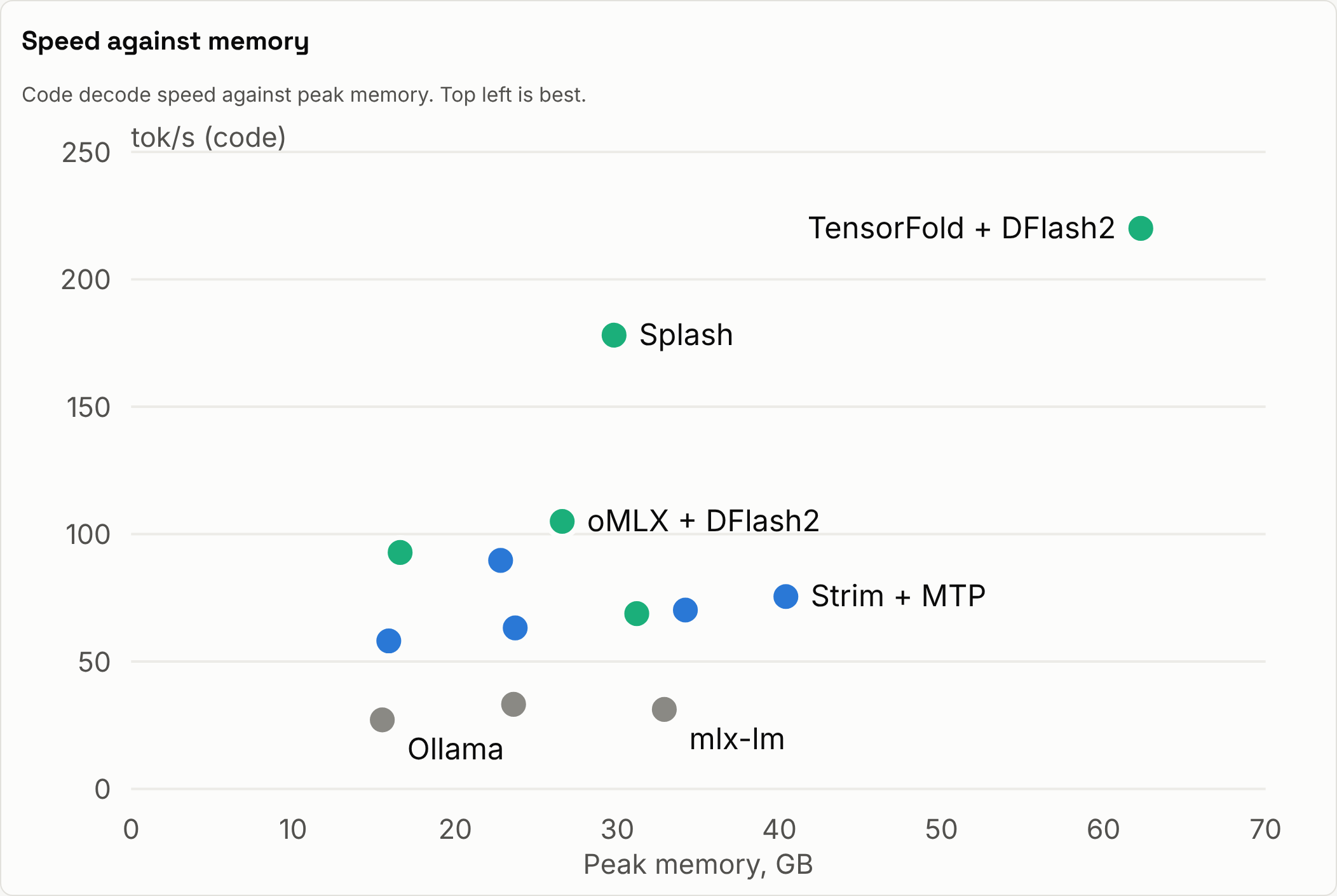
- TensorFold writes code fastest, at 220 tokens per second.
- oMLX is the best of the rest. It scores 172 and needs less memory than Splash.
- llama.cpp and Ollama use the least memory, about 16 GB at peak, roughly the size of the model file.
What we measured
Peak tokens per second only tell part of the story, so we timed four everyday jobs from start to finish:
- a 5-turn chat
- a coding-agent edit with a follow-up
- a summary of a 32K-token document
- a 1,500-token write-up
We also measured:
- writing speed (decode)
- prompt reading speed (prefill)
- several requests at once
- peak memory
The total score weights real tasks at 50%, decode at 20%, prefill at 15% and parallel requests at 15%. Memory is shown but not scored.
What makes an engine fast
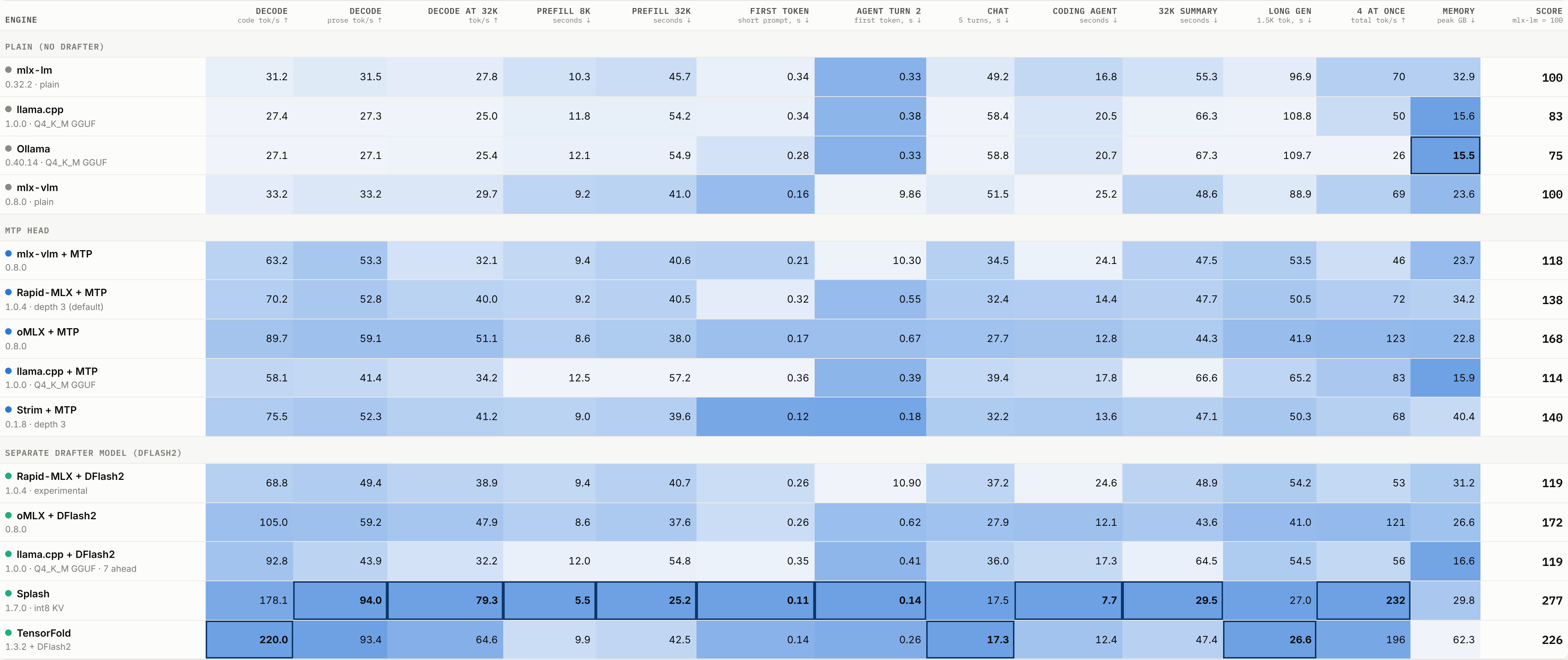
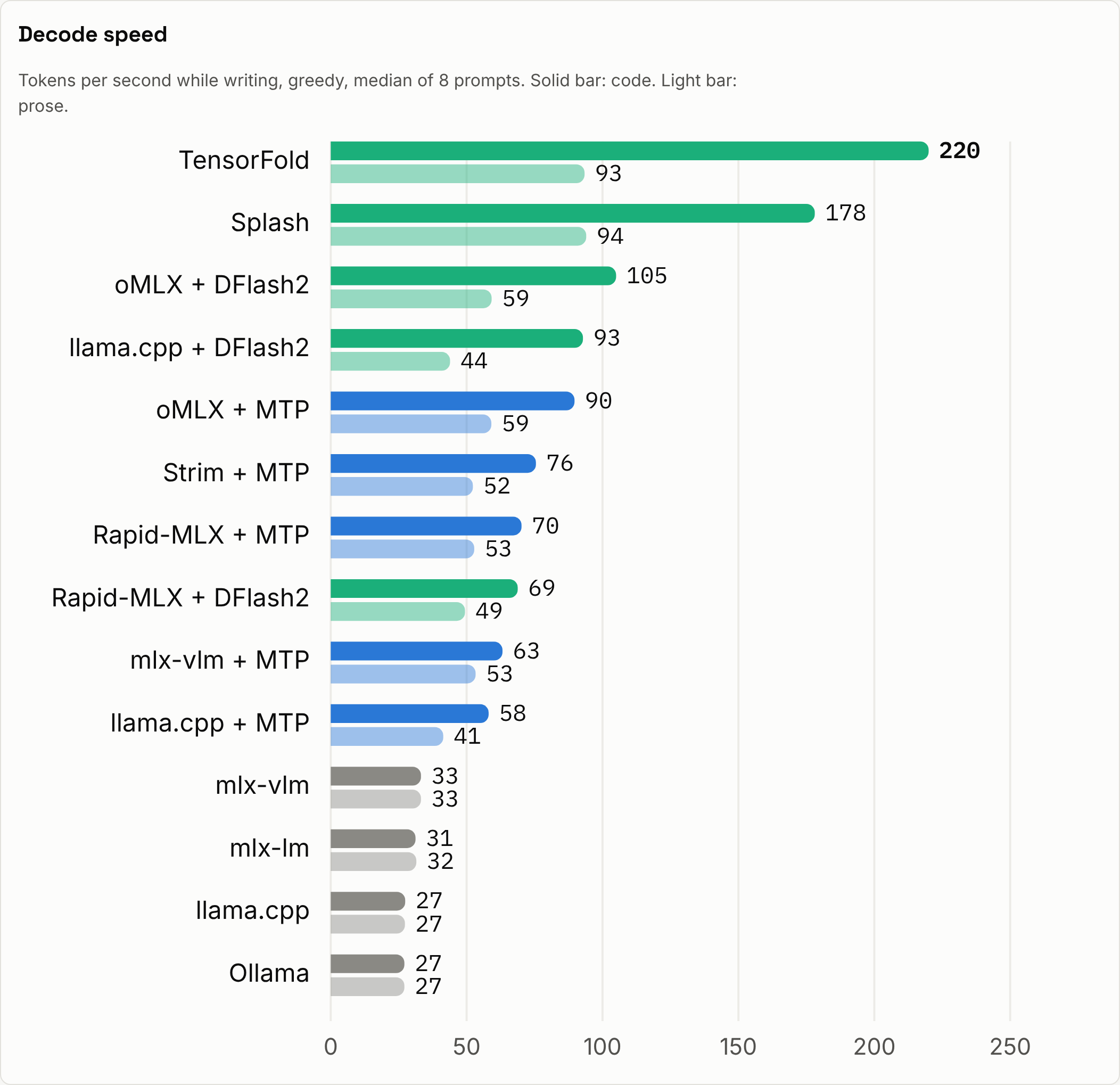
The drafter matters more than the engine. A drafter guesses several tokens ahead, and the big model checks all of them in one pass. Without a drafter, every engine writes at 27 to 33 tokens per second, because a 27B model on this Mac is limited by memory speed. With the model's own MTP head, the best engines reach 58 to 90 tokens per second. With the separate DFlash2 drafter they reach 69 to 220 on code. Prose is harder to guess, so the gains there are smaller: 41 to 94 tokens per second.
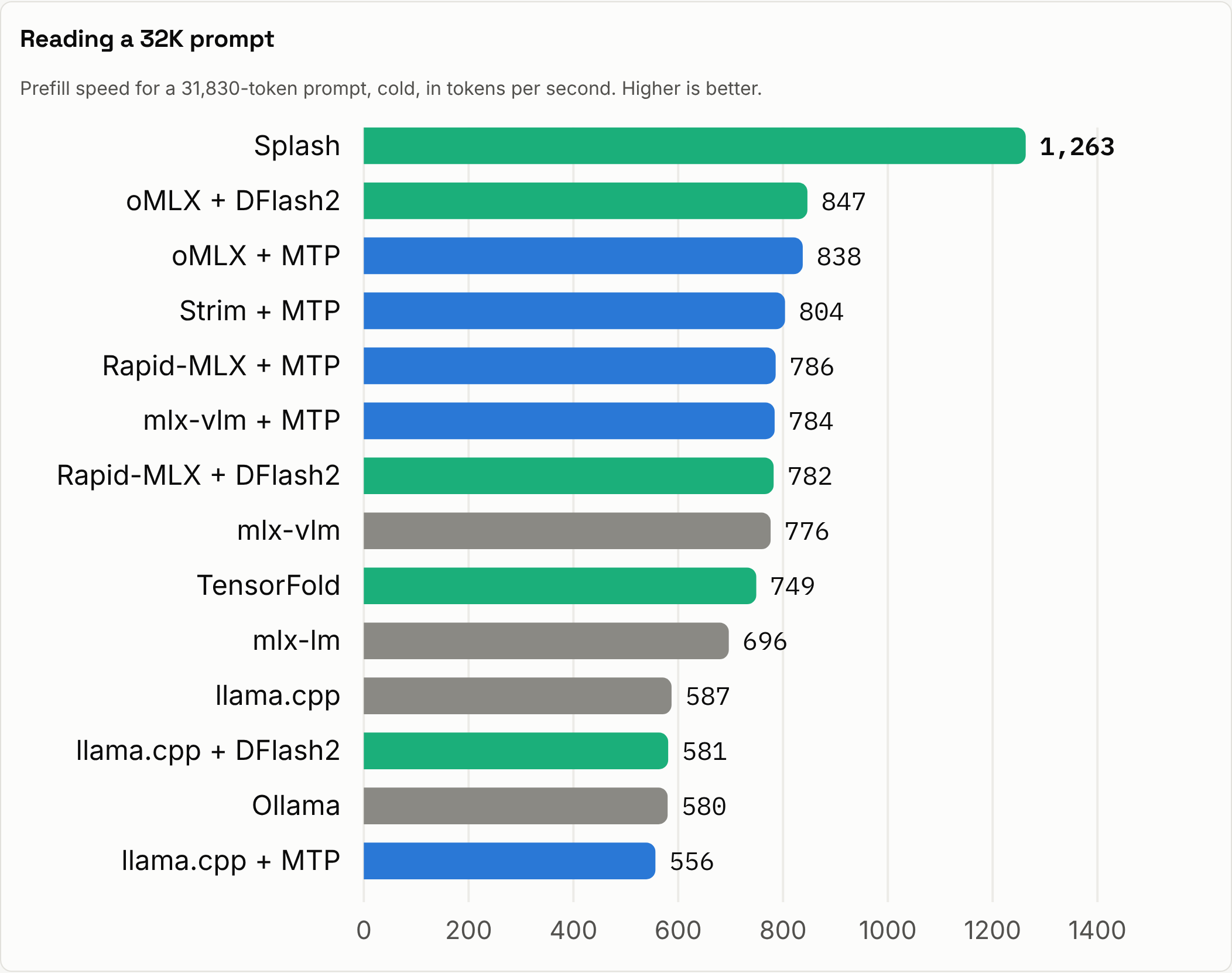
Prompt reading decides long tasks. About 85% of the time it takes to summarise a 32K-token document goes on reading it.
- Splash reads it at 1,263 tokens per second, which takes 25 seconds.
- Every other MLX engine reads at 696 to 847 tokens per second.
- The GGUF engines read at 556 to 587 tokens per second.
That is why Splash finishes the summary in 29.5 seconds while the next best engine takes 43.6.
A prompt cache makes chat and agents feel instant. Engines that keep the conversation in cache answer the next turn in 0.1 to 0.7 seconds. mlx-vlm, and Rapid-MLX with DFlash2, have no cache. They reread the whole 9K-token history on every turn, which takes about 10 seconds.
Long context slows everyone, and drafters most of all. Right after a 32K-token prompt, the other engines write at only 25 to 51 tokens per second. Splash keeps 79 and TensorFold keeps 65.
Memory is a trade-off, not a contest. The GGUF engines peak at 15.5 to 16.6 GB and the MLX engines at 22.8 to 40 GB. TensorFold peaks at 62 GB. Most of that is a prompt-cache reservation it makes by default, and you can cap it. The GGUF engines read lower partly because llama.cpp and Ollama memory-map the model file, and macOS does not fully count mapped pages.
Which engine for which job
- For chat, long documents and big files, use Splash. It reads prompts fastest (25 seconds for 32K tokens), writes prose at 94 tokens per second and finishes the 5-turn chat in 17.5 seconds, level with TensorFold (17.3).
- For code and long answers, use TensorFold with DFlash2, or Splash. They write code at 220 and 178 tokens per second, and both finish the long write-up in 26 to 27 seconds.
- For several users at once, use Splash. With 4 requests at once it serves 232 tokens per second in total, against 196 for TensorFold. The best of the rest is oMLX with DFlash2 or MTP: it serves 121 to 123 tokens per second, scores 172 or 168 and uses 23 to 27 GB, against 30 GB for Splash.
- For low memory or GGUF files, use llama.cpp with DFlash2. It peaks at 16.6 GB and writes code at 93 tokens per second. Ollama is simpler to use, but it has no drafter.
- To stay with the reference stack, use mlx-vlm with MTP. It writes code at twice the plain speed (63 tokens per second) without a separate drafter, but it has no prompt cache.
How we tested
- Hardware. MacBook Pro with an Apple M5 Max (40-core GPU) and 128 GB of unified memory, running macOS 26.7.1 on mains power. One engine ran at a time, with other model servers paused and nothing else heavy running.
- Weights. All engines used our own conversion of the stock Qwen3.8-27B. The MLX engines got a 4-bit build (16.3 GB, with the MTP head). llama.cpp and Ollama got a Q4_K_M GGUF (16.8 GB). Every engine saw exactly the same prompt tokens. All engines were called through the same OpenAI-style client.
- Settings. Thinking was off, context was 40K or more, prompt caches were on and the KV cache was 16-bit. Splash kept its default 8-bit KV cache. Each engine ran its own drafter, and every DFlash2 engine loaded the same drafter file.
- Quality. In our test the drafters did not change the output: TensorFold gave byte-identical answers with and without its drafter. Across engines, outputs matched or drifted apart late because of rounding, and they stayed coherent. Sampled runs at temperature 0.7 kept the same leaders.
- Memory. Peak memory is in decimal GB, the same unit as the file sizes above.
- Versions. mlx-lm 0.32.2, mlx-vlm 0.8.0, oMLX 0.8.0, Rapid-MLX 1.0.4, Strim 0.1.8, TensorFold 1.3.2, Splash 1.7.0, llama.cpp 1.0.0 and Ollama 0.40.14.
This is our own test on one MacBook Pro M5 Max, not an official benchmark. NetProjects is not affiliated with any of these engines. Engines change quickly, so these results hold for the versions listed above. All tests ran on 20 and 21 November 2026. This article was drafted with AI assistance, then edited and approved by people on our team. You can read more about how we use AI at https://netprojects.com/standards/ai.